5 minute read · Practical field guide
Pick a job with a clear finish
An agreed service appointment is a useful example. The application has a date and time, the business wants to confirm it, and the customer can answer or ask for a change. That gives the workflow an observable purpose beyond successfully calling a messaging API.
SMS can be a practical starting channel because a short confirmation needs little presentation. The recipient can use an ordinary text conversation while your application manages the business record behind it. Confirm the provider’s supported setup, audience requirements and charges before going live.
Write the message before wiring the automation
Draft the text as if a person had to act on it immediately. Identify the business, state the appointment and ask one question. Example: “Hi Alex, Mara at Ridge Service. Is Tuesday at 2 p.m. still good for the equipment visit?” Use the actual time zone when needed.
Have the responsible team review the wording and the conditions that trigger it. A clear message sent after an appointment was cancelled is still the wrong message. Check the current record when the action is about to run.
Make the reply part of the design
Choose what happens to a confirmation, a request to reschedule and an answer the system cannot interpret. The first version can send every reply to a staffed queue. You do not need to automate the full conversation to make the reminder useful.
Connect the incoming reply to the right contact and appointment. Preserve enough context that a colleague can understand what was asked and complete the next step. Avoid automatically treating an ambiguous “yes” as approval for a different pending request.
Finish one complete loop
In a controlled trial with consenting participants, send the reminder, observe the provider’s result, receive the reply and update the work record. Provider acceptance, delivery information and the customer’s answer are distinct observations. Keep them separate in the application.
Once the team can run and recover that loop, decide what would genuinely make it easier. That might be a better inbox view, a clearer template or a supported iMessage option for another use case. Add the next feature because it solves a demonstrated problem, while keeping the original workflow understandable.
Give the business task its own identifier
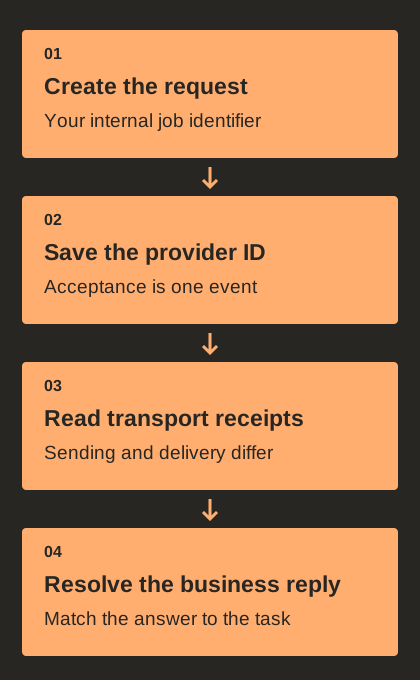
A first reminder workflow needs more than a phone number and message body. Keep an internal identifier for the task that caused the send: an appointment reminder, pickup notice or requested update. Link it to the relevant business record and store the provider’s message identifier separately when the request is accepted. This makes it possible to investigate a send without confusing it with another text to the same recipient.
The two identifiers answer different questions. Your job identifier says why the business wanted to communicate; the provider identifier describes a particular messaging attempt. A retried event may refer to the same business job, while a deliberate later update may be a new job. Write this distinction down before adding retries so a repeated notification does not automatically become another customer message.
Model outcomes beyond sent and failed
A provider can accept a request before it reports a transport outcome. Your business can also complete its task after a customer reply even if that reply is handled outside the original sending process. Keep the outgoing attempt state, incoming events and business resolution separate. A single boolean called “sent” cannot represent all of those facts clearly.
For a fictional appointment workflow, record whether the reminder is due, submitted, awaiting a relevant response, resolved or cancelled in your application’s own terms. Preserve provider status values in their own field and map them deliberately where needed. Do not rename a delivery receipt “customer confirmed.” Use the provider’s current documentation to understand each status and test how later events affect the stored record.
Design the uncertain-send recovery path
An HTTP timeout can leave the client uncertain about whether a provider accepted the request. Retrying immediately as a brand-new operation may create two messages. Before implementing automatic retries, read the provider’s idempotency and lookup behavior for the endpoint you use. Store enough information to reconcile the attempt and decide what to do when its outcome remains unknown.
A small workflow can begin with an operator queue for uncertain sends. The operator checks the existing attempt, records a decision and prevents parallel workers from repeating the same job. That may be easier to reason about than an aggressive retry loop during an early pilot. Expand automation when the supported recovery path is understood, including the case where a message is no longer timely enough to send.
Finish with a trace another developer can follow
A useful trace connects the source business event, prepared message, provider request, status events, inbound reply and final task update. Record relevant identifiers and times while avoiding unnecessary duplication of customer content. A colleague should be able to explain whether a reminder was skipped, attempted, delivered under provider semantics or resolved by a customer response.
Use this trace in a small acceptance pack. Include a normal reply, a changed appointment, a duplicate event, an expired reminder and an unsuccessful record update. Confirm the business state as well as the message status after each test. Public documentation can describe the transport interface; the test record should describe what your application actually did. That separation keeps a simple first workflow maintainable as more automation is added.